
Google Ads for Things to do: the move from PMax to Search with AI Max
Google took control away with PMax. For Things to do, they just gave some back. Every new control, tested hands-on in live tour accounts, plus the ones you still do not get.
Google keeps removing control from advertisers. Match types. Placements. Search terms. One by one, the levers moved from your hands into the algorithm. This time, for Things to do, they gave some back.
I have already started moving campaigns off Performance Max in the accounts I manage. One of them is a tours marketplace with a large product feed. What I have seen in the new Search setup is the opposite of the last five years of Google product decisions. More visibility. More structure. More of the account back under my control. That is worth writing about, because it almost never happens.
What Google Things to do ads are
Things to do ads are the Google Ads placements that show tours, activities and attractions when a traveller searches for them. Google describes them as ads that appear when someone searches for experiences, activities or local attractions, on Google Search and on Google Maps.
They are triggered by two kinds of searches. The first is a point of interest, such as a landmark, a museum or a park. The second is an experience, such as things to do in a particular city.
The ads are built from a Things to do product feed rather than written by hand. Each one shows photos, a price, your company name and a booking link, taken from a Things to do product feed, which you can supply yourself or through your booking system or connectivity provider. In the older Travel campaigns, the only bid strategy was Maximize conversion value with a required target ROAS.
That setup is now changing. Google's help page for Things to do ads says that from Q3 2026, Travel campaigns will be migrated to new Search campaigns for Travel, which mirror the closest equivalent settings of the old campaigns. The rest of this guide is about what that move means in practice.
What actually changed
Google is retiring the old Things to do setup and moving travel advertisers into Search Campaigns for Travel, with AI Max capabilities. The beta opened to Things to do advertisers in July 2026, and auto-migration of old campaigns followed. I covered the rollout sequence in an earlier post on LinkedIn, with the dates and what got deprecated.
This guide is about something different. Not the timeline. The controls. I have been building these ad groups by hand in live accounts, and this is what the migration hands back once the campaign is running.
I am not going to trash PMax as a product. It works for plenty of accounts. My problem was never the machine learning. It was the control model. In PMax you hand Google the feed, the budget, and the intent, and you get a black box back. Search with AI Max opens the box. I wrote separately about what PMax does to a tour account if you want that side of the story first.
Why Search with AI Max beats PMax for Things to do
Three things come back the moment you make the switch.
- Search terms you can see again
- Structure you own at the ad group level
- A campaign you can actually steer
Start with search terms, because this is the one that changes how you work day to day.
Here is the before. Running a Things to do feed in PMax, you worked from aggregate insights. Category themes. Trend groupings. For years you could not see the exact thing someone typed before your ad showed. When a museum-ticket query fired against your food-tour ad, you could not name it or block it. Google has been restoring query-level search terms and campaign-level negative keywords to PMax through 2025 and 2026, which helps. The restored version still has limits, and it arrived after years of waste nobody could see.
Here is the after. In Search with AI Max, the search terms report works the way it always should have. You open it. You see what people actually typed. You decide. That museum-ticket query against your food-tour ad is now sitting in a row you can read. You add it as a negative and it stops spending against the wrong intent.
That is the difference between guessing and auditing. In PMax you optimise toward a theme. In Search with AI Max you optimise toward the query.
Then structure. AI Max runs inside a Search campaign, so you keep ad groups. You can build one ad group to target a single interest for a single location. Real structure, decided by you, not inferred by a model.
Google is also enriching Search ads with travel feed data now. Hotel Center or Actions Center feeds can add pricing, images, and availability straight into the ad. Google's own claim on this: advertisers who use their full range of formats see up to a 20% increase in click-through rate. That number is Google's, not mine, so treat it as a vendor figure. The feature is live in 20 countries and 12 languages. Link a feed to an account that already runs Search or PMax and it becomes automatically eligible.
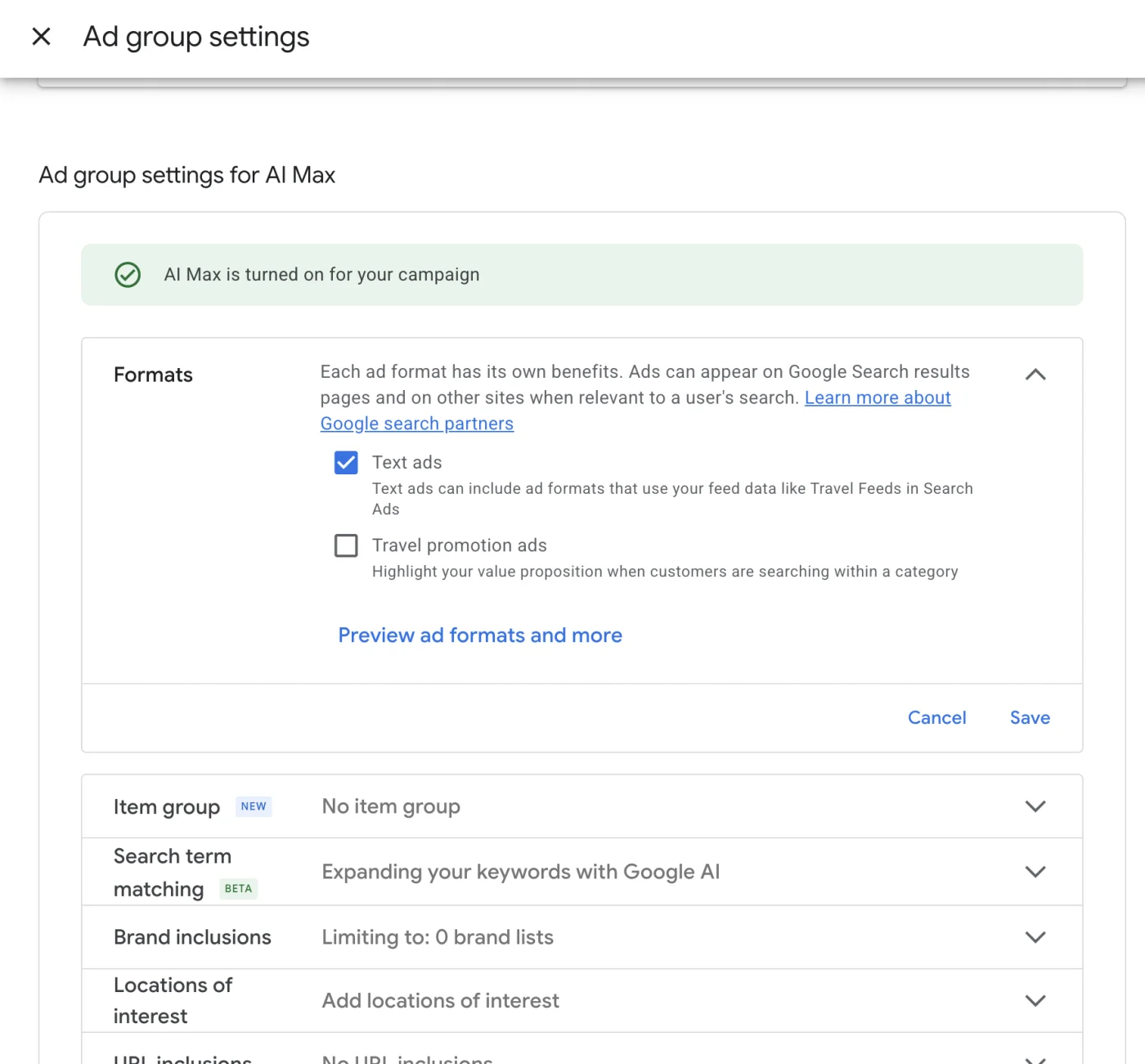
The new ad-group controls, one by one
This is where the migration earns its keep. Four settings matter most.
Formats
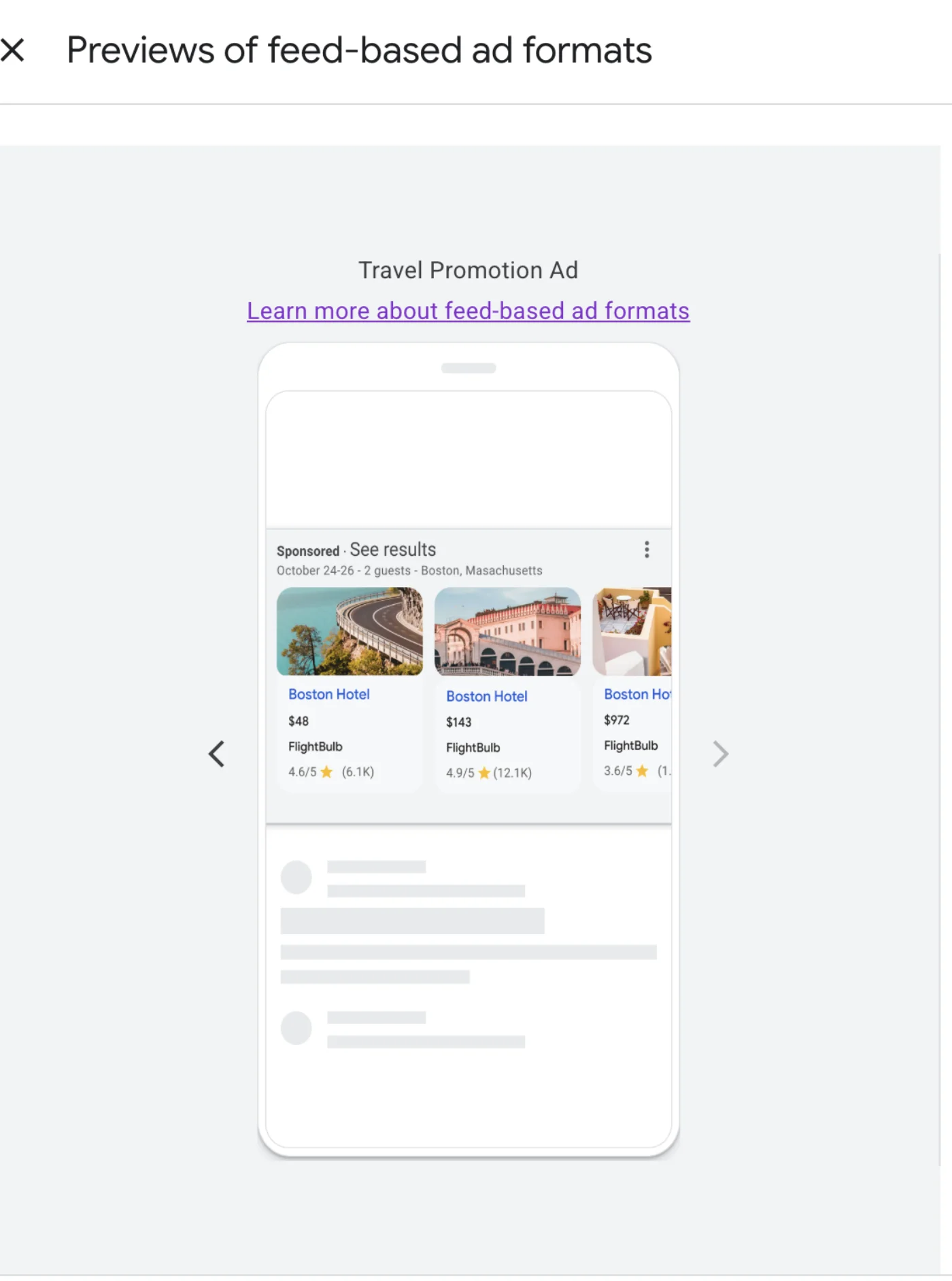
Each ad group has a Formats setting with two options: Text ads and Travel promotion ads. Travel promotion ads used to be a hotels-only format. In the tours account I manage, the UI now offers them to a Things to do advertiser. Worth a caution here: Google's own help pages still describe travel promotion ads as a hotel format. The UI in a tours account says otherwise. The docs have not caught up with what the product already ships.
Item groups
This one carries a NEW label in the interface. Enable an item group on an ad group and you can filter the feed down to exactly what you want to promote. You can filter three ways.
- By location: item country, region, or city, with include or exclude, and AND logic between the types
- By rating: for example, only 4 and 5 star tours
- By item: promote one single tour or product
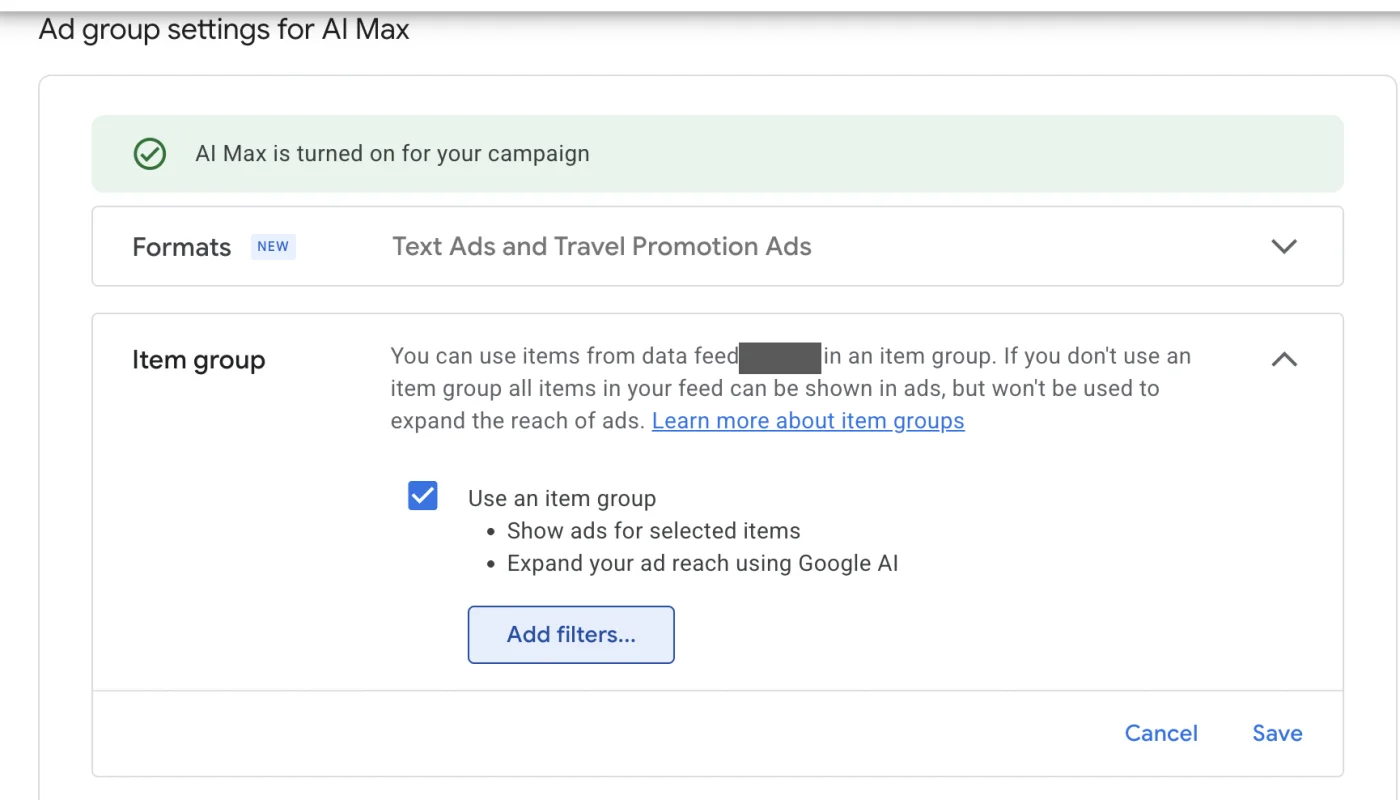
Before you add any filter, the item group shows the whole feed. In one of my ad groups that was 876 items at 100%. Add a location filter and the count drops to only the products that match. The UI copy is plain: Show ads for selected items, sitting next to Expand your ad reach using Google AI.
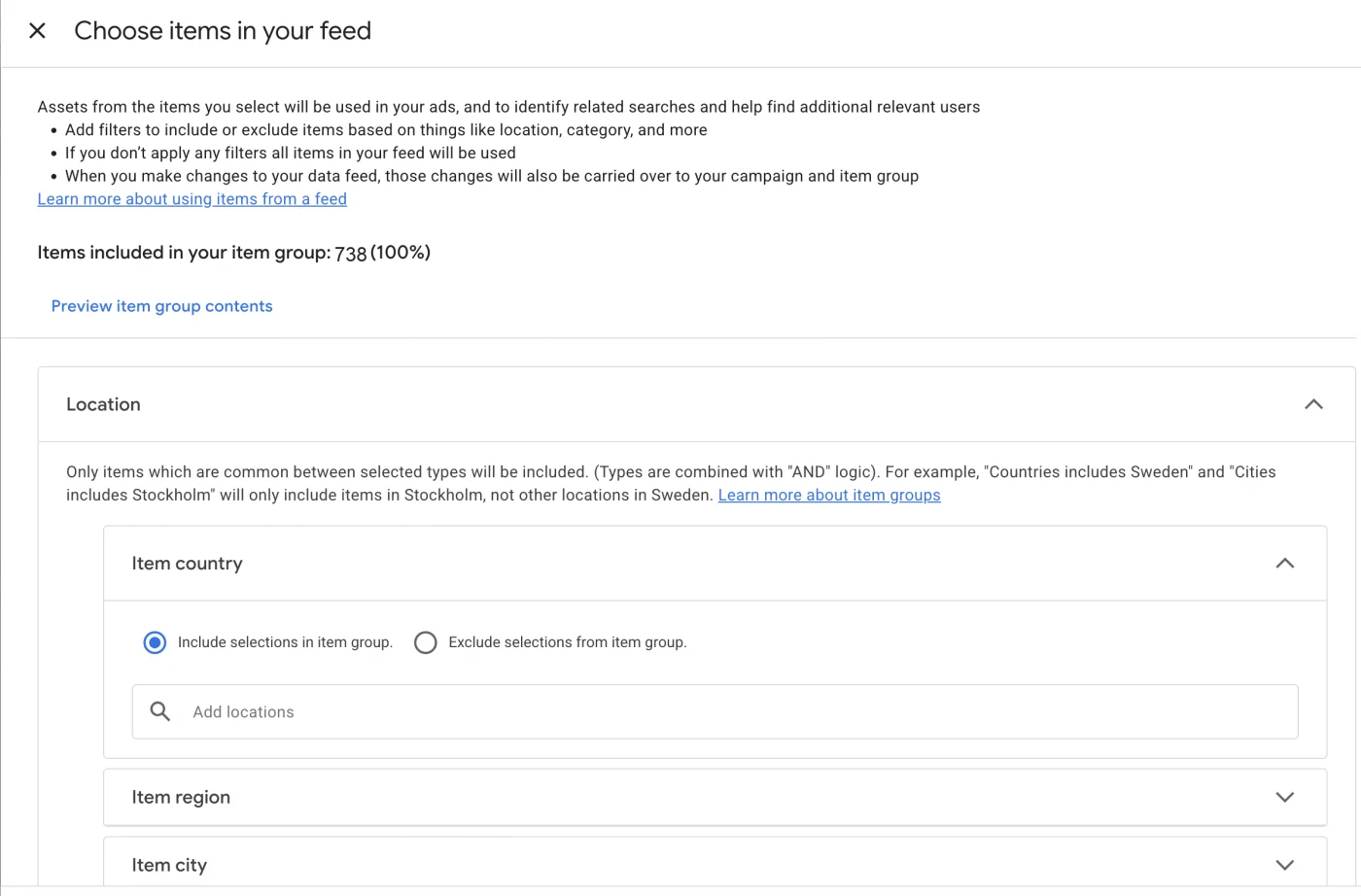
Walk it through the way an operator or a marketplace actually would. You have that ad group open. You tick Use an item group. All 876 items sit there at 100%, the entire feed, every product in one bucket. That is not an ad group. That is a catalogue.
So you click Add filters. Choose Location, then item city, and enter the one city this ad group is meant to sell. The 876 drops to only that city's tours. Now the ad group sells what its keywords and its location settings already promised, nothing else.
Want a quality cut instead. Add the rating filter and keep only your 4 and 5 star products, so your best-reviewed inventory carries the spend. Want to push a single hero tour. Use the item filter and promote that one product on its own. Same panel, three different jobs.
That is the point of item groups. Each ad group stops being the whole feed and starts being one deliberate slice of it. For a marketplace with hundreds of products, that is the difference between a tidy account and a pile of overlap.
Locations of interest
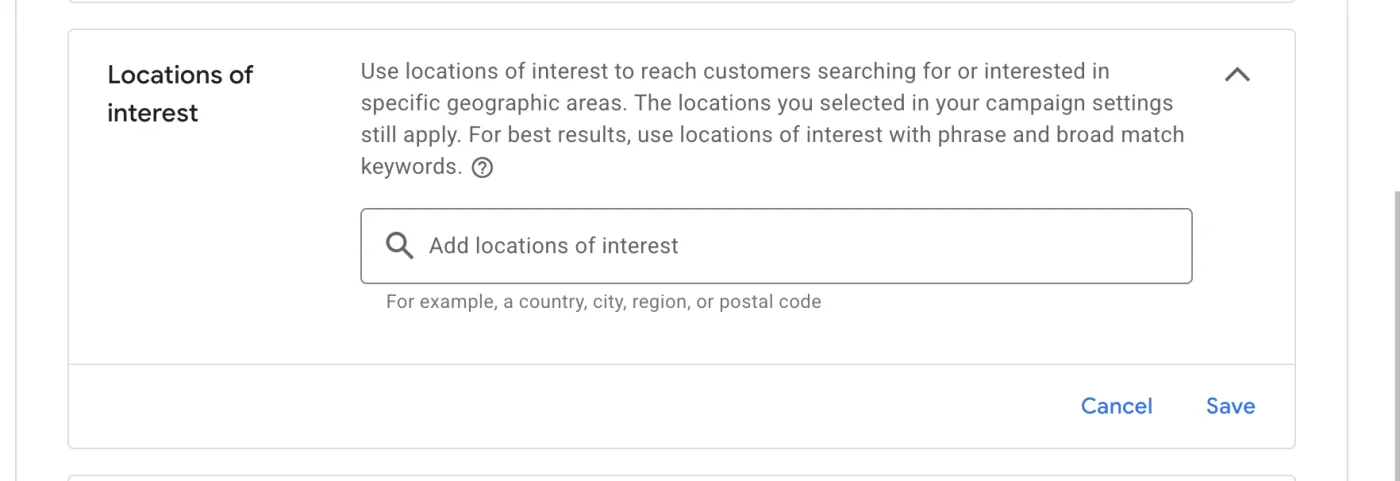
This is the one that surprised me. Locations of interest used to exist at campaign level. Google removed it about three years ago. It is back now, at the ad group level.
Here is why it matters for tours. Someone in New York searching for colosseum tickets is a customer. Someone standing in Rome searching the same thing is a different customer. Locations of interest lets you reach people searching for or interested in a geographic area, on top of your normal location settings. Google's guidance is to use it with phrase and broad match keywords. It accepts a country, city, region, or postal code.
Three controls that did not exist for Things to do, plus one that came back from the dead. That is a real shift in who owns the account.
What you still cannot control
I am not going to sell you a clean story. Some of this is still Google's call, not yours.
Bidding stays locked at campaign level. Inside the ad group settings, you cannot change the bidding strategy. You can structure the targeting all you want, but the bid decision lives one level up, and the algorithm runs it. That is the biggest limitation. It is the one people will miss when they assume ad group control means full control.
AI keyword expansion is on by default. The Search term matching setting, still in beta, expands your keywords using Google AI. It is enabled unless you go and check it. Same theme with item groups: right next to show ads for selected items sits expand your ad reach using Google AI. Google's instinct is still to widen the net for you.
So the honest read is this. You got visibility back. You got structure back. You did not get the bid back, and the defaults still lean toward expansion. Know that going in, and check every default before you trust it.
What to do if you run a tour business
- Move off PMax into Search with AI Max, deliberately, one campaign at a time. Do not rush the whole account in a weekend
- Open the search terms report on week one. This is the lever you did not have in PMax. Use it. Add negatives
- Build ad groups around one interest and one location each. Let the structure carry the targeting, not one giant catch-all group
- Turn on item groups and filter the feed: by rating for your best-reviewed tours, by city for your strongest markets, by item when you want to push one product
- Test travel promotion ads even though the help docs still say hotels only. The UI offers them. Feed-based ads with prices and ratings earn attention
- Use locations of interest to separate in-destination searchers from people planning at home. Pair it with phrase and broad match
- Check the defaults. Search term matching beta is on. Item group expansion is on. Decide what belongs in your account, not what Google set for you
None of this replaces your OTA bookings. It sits on top of them, additive, and it makes you a little less dependent over time.
Common questions
What replaces Performance Max for Things to do campaigns?
Google is moving Things to do advertisers into Search campaigns for Travel with AI Max. The new setup returns the search terms report, ad-group structure, per-ad-group feed filtering through item groups, and locations of interest.
Can you see search terms in Things to do PMax campaigns?
For years PMax showed only grouped category insights. Google has been restoring query-level search terms and campaign-level negative keywords through 2025 and 2026, with limits. Search with AI Max gives the standard search terms report and full negative keyword control.
What are item groups in Google Ads AI Max?
Item groups are a feed filter you set on each ad group. You can narrow the feed by item location (country, region, city), by rating, or down to a single item, so each ad group promotes one deliberate slice of inventory instead of the whole catalogue.
Move one Things to do campaign off PMax this week and open the search terms report you have not seen in years.
A version of this article first appeared on LinkedIn. Sources: Google's up-to-20% CTR claim, travel feeds in Search ads, 20 countries and 12 languages, and automatic eligibility on feed link are from Google's help documentation (support.google.com/google-ads/answer/15265488). The definition of Things to do ads, the bidding rule for Travel campaigns and the Q3 2026 migration notice are from support.google.com/google-ads/answer/10723637, checked on 29 September 2026. Travel promotion ads are documented as hotels-only at support.google.com/google-ads/answer/10266883 while the UI offers them to Things to do accounts. All ad-group control findings are first-hand from a tours marketplace account under management.
- Performance Max for tour operators: useful, risky, and changing
- How tour operators can reconcile Google Ads with booking data
- What is a good ROAS for a tour operator?
All guides live in the writing hub.
I am Kourosh. I work as a growth partner for tour and experience operators.
If your ad account and your booking system tell two different stories, that is usually where I start.
For tour operators Book a call